
Key Takeaways
- GEBRA supports secure sharing of only the necessary data through sample-level access management (Access Group).
- There is no need to open up your entire institutional database for external expert consultations or multi-institutional collaborative research.
- Administrators (Admin) can flexibly configure access permissions at the user, sample, and project levels.
- The ‘Request Access’ feature allows permission request workflows to be handled naturally within the system.
- Sample-level access control simultaneously enhances both the security and operational efficiency of clinical genomic analysis workflows.
Sample-Level ‘Access Group’
In clinical genomic analysis, external expert consultations and multi-institutional collaborative research are becoming increasingly vital. However, in real-world operations, strict data security policies often make it incredibly difficult to share only the necessary samples safely.
“I just want to share this specific sample to get an expert opinion, but I can’t open up our entire institutional database…”
“Extracting data into Excel sheets and emailing them every single time is tedious—and I’m constantly worried about data breaches.”
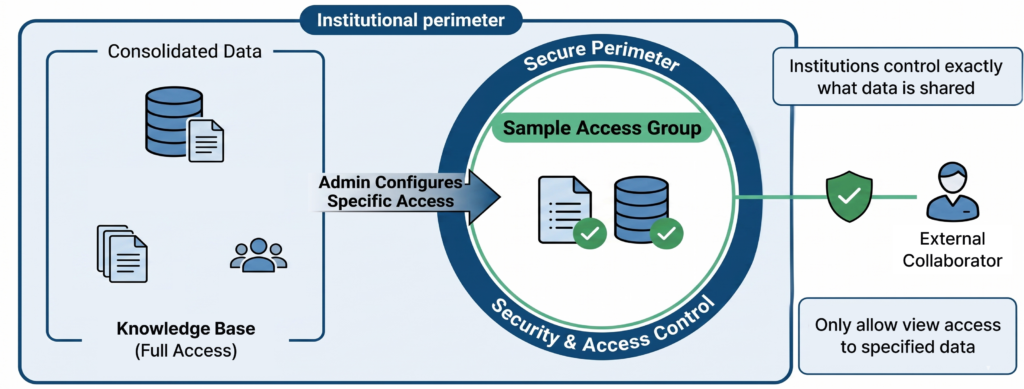
In clinical genomics, data security and collaboration efficiency often pull in opposite directions. As a result, many institutions have relied on manual, off-system processes to exchange data. This workaround introduces risks that go beyond mere operational inconvenience—leading to potential issues like data version mismatches, data leakage during transit, and a complete lack of an audit trail.
GEBRA’s ‘Sample-Level Access Group’ feature solves this conflict, allowing you to securely share specific samples without exposing your institution’s entire dataset.
1. Why Sample-Level Access Management Matters
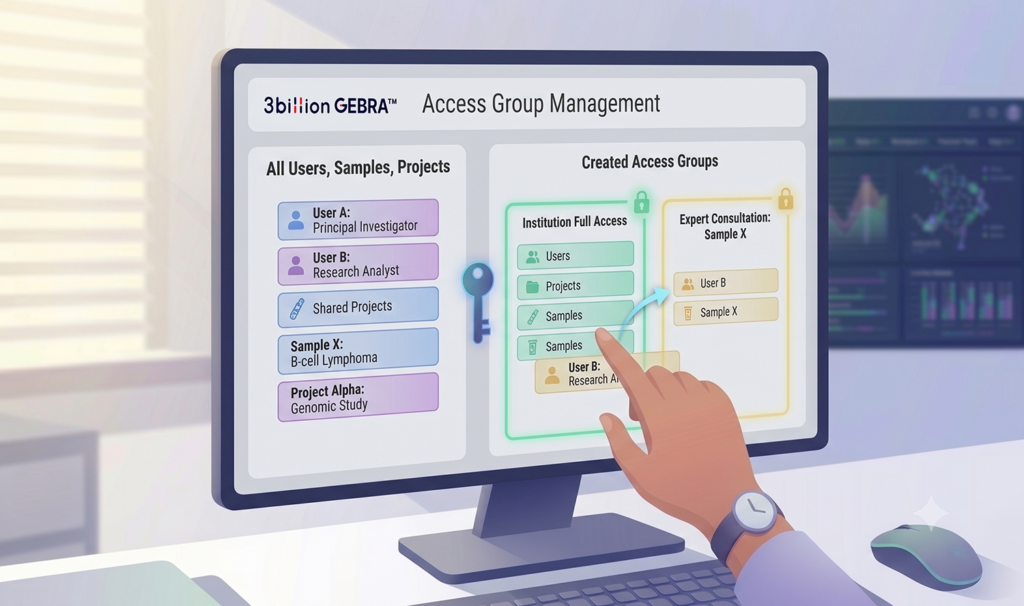
Administrators (Admin) can now independently control access permissions by grouping users, samples, and projects together in a dedicated configuration tab.
a. Flexible ‘Access Groups’ Tailored to Your Goals
Within the newly added Admin tab, you can freely combine users, samples, and projects. Whether it is a multi-institutional research project or a single sample for a quick consultation, you can build custom security boundaries that fit your team’s exact workflow.
b. User Control Starting from the Invitation Stage
When inviting a new user, Admins can choose between ‘Full Access (Default Group)’ for comprehensive institutional data access, or a specific ‘Access Group’ for restricted viewing. By defining the access scope at the very moment of invitation, GEBRA structurally prevents accidental internal data exposure caused by administrative oversight.
2. How Clinical Genomics Teams Use Access Groups
Sample-level access control is most valuable when collaboration requires sharing only a subset of genomic data.
a. External Expert Consultation
A laboratory identifies a rare variant and wants to obtain a second opinion from an external specialist. Instead of exporting files or providing broad database access, the team can grant access to only the relevant sample.
b. Multi-Institutional Research
Research partners often need to review shared cases while keeping institutional datasets separated. Access Groups allow each collaborator to view only the samples assigned to a specific project.
c. Internal Training and Case Review
New analysts, trainees, or rotating fellows can review selected cases without gaining access to the organization’s entire genomic database.
d. Temporary Collaboration
When a short-term project requires external participation, administrators can provide limited access to only the required samples and remove access once the collaboration ends.
3. Request Access: A Seamless Collaboration Workflow
Restricting an external user’s data access shouldn’t mean breaking the communication flow. GEBRA meticulously designs its user experience to keep collaboration seamless, even under tight security.
Smooth Communication via ‘Request Access’
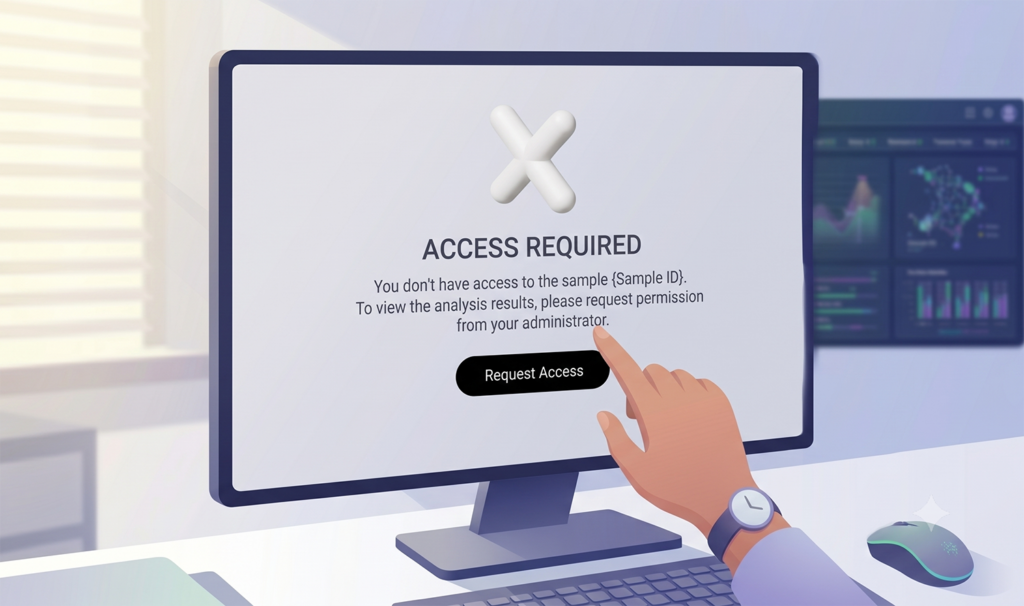
Imagine an external researcher or collaborator browsing your institution’s Knowledge Base who encounters a sample they don’t have permission to view. Instead of hitting a frustrating dead-end or an error screen, GEBRA keeps their workflow moving.
Through the ‘Request Access’ feature, users can immediately request permission from the Admin directly within the UI. This eliminates the need for separate emails or manual tracking, keeping the collaborative workflow fluid and native to the platform.
4. How Sample-Level Access Controls Transform Operations
Before Access Groups:
- Export sample data manually
- Share files through email
- Track permissions outside the platform
- Manage collaboration through spreadsheets
After Access Groups:
- Share only the required sample
- Keep collaboration inside the platform
- Maintain auditability
- Reduce operational overhead
- Improve data security and governance
GEBRA™ safeguards your valuable clinical data at every stage of genomic analysis. At the same time, it delivers a secure, collaborative environment where internal users, external experts, and partner institutions can work together effectively.
See how clinical genomics teams use Access Groups to collaborate securely while maintaining data governance and operational efficiency.
FAQ
Q1. When should sample-level access control be used in clinical genomics?
A. Sample-level access control is useful whenever a team needs to share specific cases without exposing an institution’s entire genomic dataset. Common examples include expert consultations, collaborative research, and case reviews.
Q2. Can external experts review genomic data without accessing all institutional data?
A. Yes. Access Groups allow administrators to share only the required samples or projects while keeping unrelated data protected.
Q3. How does sample-level access control support multi-institutional collaboration?
A. Each institution or collaborator can be assigned access only to the samples relevant to a specific project, enabling secure collaboration while maintaining data governance.
Q4. What operational challenges can Access Groups solve?
A. Access Groups reduce manual data exports, email-based sharing, and permission tracking outside the platform, helping teams improve efficiency, security, and auditability.
답글 남기기
댓글을 달기 위해서는 로그인해야합니다.